Circle to Search Just Got Smarter, and Google Used Samsung’s Stage to Prove It

Google has a habit of showing up to Samsung’s Galaxy Unpacked events with something worth talking about. This year was no different. Alongside the launch of the Galaxy S26, Google announced a meaningful upgrade to Circle to Search, one that moves the feature well beyond its original single-tap premise.
What Circle to Search Could Do Before
When Google introduced Circle to Search at the Galaxy S24 launch in 2024, the concept was straightforward: draw around something on your screen and get results instantly, without switching apps. It was a genuinely useful shortcut, and it spread to a wide range of Android devices fairly quickly.
But it had a clear limitation. You could only search one thing at a time. Circle a dress, get results for that dress. Circle a fish, find out what kind of fish it is. That was the ceiling.
That ceiling just got raised.
Multi-Item Search Is the Real Upgrade Here
The headline improvement in this update is the ability to search multiple elements within an image simultaneously. Instead of circling one item and repeating the process for each thing you’re curious about, you can now select several at once and get a unified, contextual response.
Google’s own example involves a photo of different fish species. Circle all of them together, ask a question like “what are all these fish and how do they coexist,” and Circle to Search identifies each species individually while also explaining how they interact in their environment. It names them, shows related images, and links out for more reading.
That shift from single-item lookup to multi-item analysis is more significant than it sounds. The feature stops behaving like a search box and starts behaving more like a research assistant.
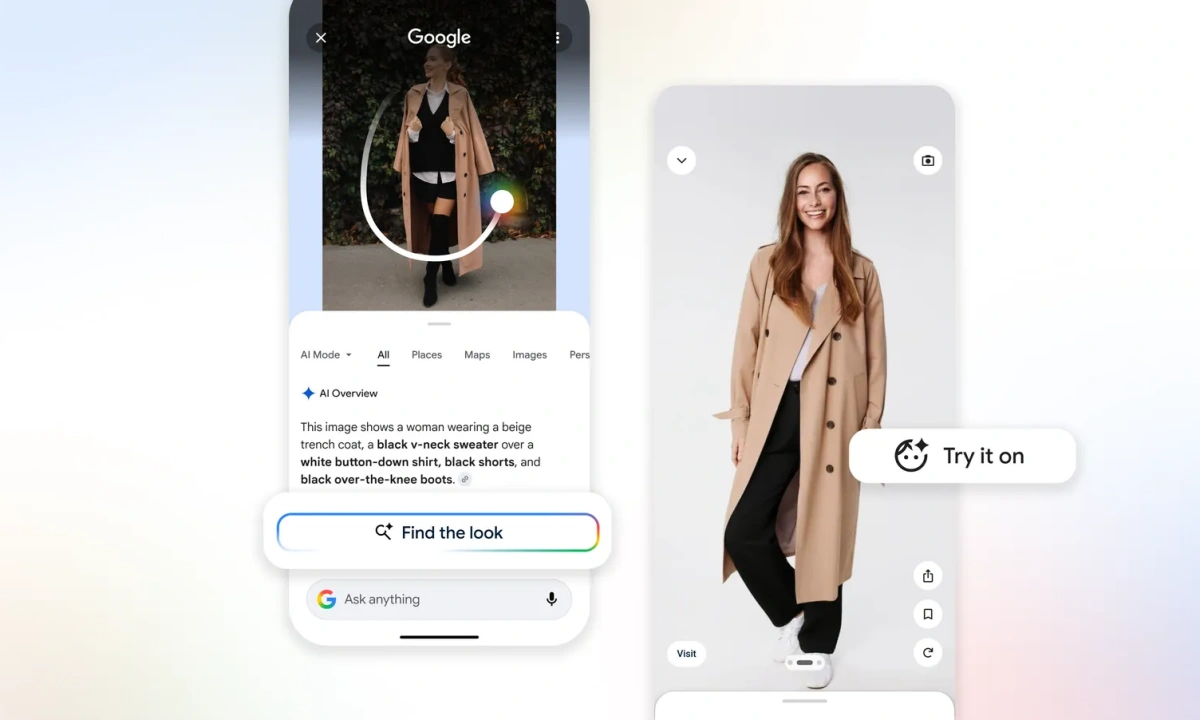
The fashion use case makes this even clearer. Search an entire outfit and the tool breaks it down piece by piece, identifying the jacket separately from the shoes, the bag separately from the trousers, and surfacing similar products for each. For anyone who has spent time trying to hunt down individual items from a single styled image, that is a legitimate time saver.
Try It On Comes to Circle to Search
There is a second addition bundled into this update. Google’s “Try it on” feature, which was previously tucked inside the Products section of Google Search, is now accessible directly through Circle to Search.
You circle a clothing item or outfit you like, complete the search, and then tap a button to virtually try it on. The feature has existed in some form already, but bringing it into Circle to Search removes a few steps from the process and puts it where users are already looking.
Gemini 3 Is Doing the Heavy Lifting
None of this would work the way it does without a more capable model behind it. Google has been explicit that Gemini 3‘s planning, reasoning, and action capabilities, introduced last November, are what make the multi-item search function possible.
Rather than finding a single match and calling it done, the model now builds a multi-step plan. It automatically identifies the most important parts of an image, crops them intelligently, runs multiple searches at the same time, and then compares those results to deliver a more accurate and complete answer. The user sees a clean output. The work happening underneath is considerably more involved.
Which Devices Get It First
Google confirmed in a post on The Keyword that the updated Circle to Search is rolling out first on the Galaxy S26, Galaxy S26 Plus, and Galaxy S26 Ultra, along with Google’s own tenth-anniversary Pixel lineup, including the Pixel 10, Pixel 10 Pro, Pixel 10 Pro XL, and Pixel 10 Pro Fold. Broader availability across other Android devices is expected to follow.
For anyone already using Circle to Search as part of their daily phone habit, this update makes a feature that was already convenient into something noticeably more capable.