News
One UI 8.5 Has a Useful Fix for Anyone Sensitive to Flashing Lights

Photosensitivity does not get much attention in smartphone software, but for people who experience discomfort or worse from strobe effects in videos, it is a genuine daily concern. Samsung has quietly addressed this in One UI 8.5.
The feature is called Strobe Attenuation. When enabled, it automatically dims video content that contains flashing or strobing effects, reducing the visual intensity without requiring the user to manually intervene or avoid certain content altogether.
It is a small but thoughtful addition, and the kind of accessibility feature that tends to go unnoticed by most users while making a real difference for those who need it.
Finding it, however, is not straightforward. Searching for it within the Settings app does not surface the option, so you have to navigate there manually. Go to Settings, open Accessibility, then select Visual Aids. The Strobe Attenuation toggle is there.

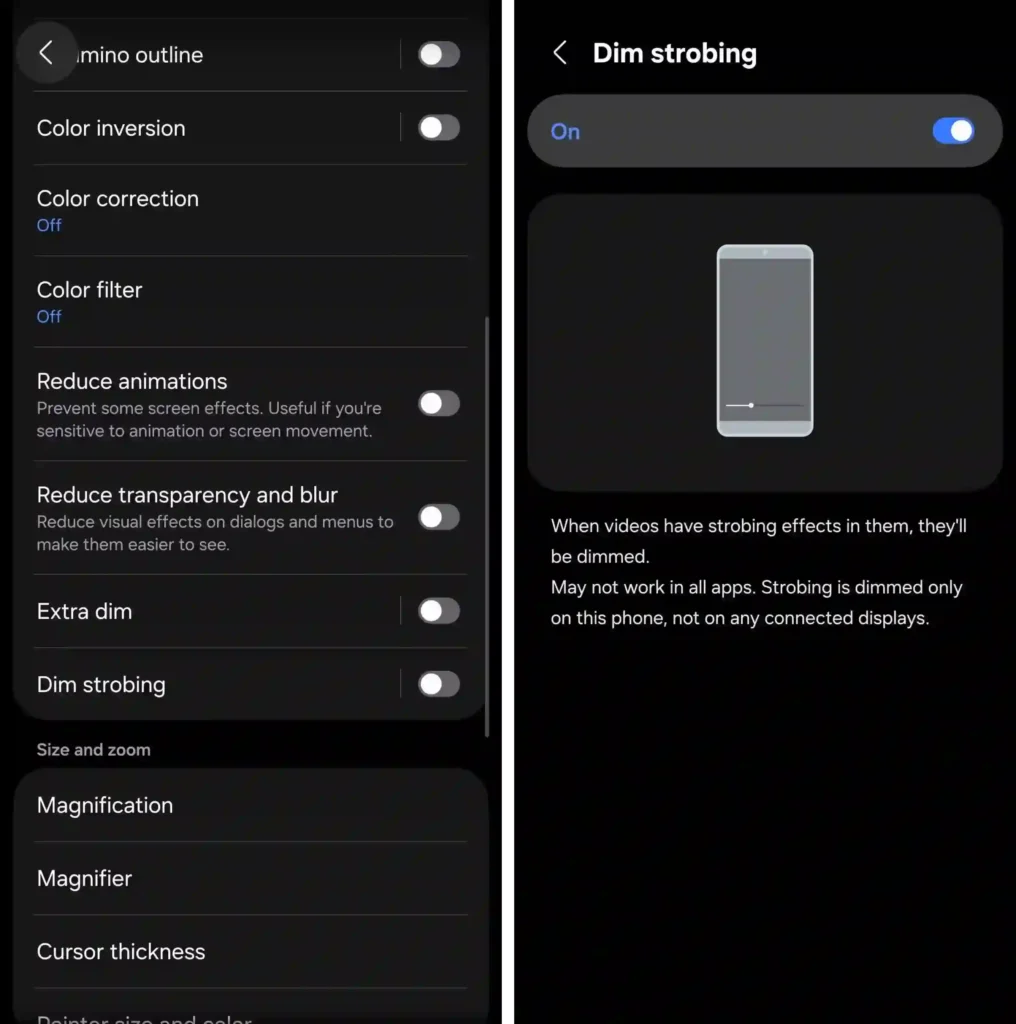
A few limitations are worth knowing upfront. Samsung notes the feature may not work with all apps or every type of video content, so compatibility is not guaranteed across the board. It also does not sync across devices. If you enable it on your phone, it will not automatically activate on your tablet. Each device needs to be configured separately.
That last point is a minor inconvenience, but it does not diminish the feature’s value. For One UI 8.5 users with light sensitivity, this is exactly the kind of software detail that justifies staying within Samsung’s ecosystem.
Via – SamMobile